Online Privacy
Proxiyum Unveiled: A Practical Guide to Browser-Based Privacy and Unblocking
Proxiyum is a free browser web proxy for hiding your IP on one session, opening a basic filter, or checking a public page from another region. This guide shows how the request is routed, how to use it, and why it is not a substitute for a VPN.
Sanif Sultan
October 5, 2026 · 7 min read

Online privacy is not an all-or-nothing project. Most people do not need a full encrypted tunnel for every app on their phone. They need a quick way to hide their IP address from one website, open a page their school or office blocks, or check how a site looks from another country. That is the narrow job free web proxies are built for, and Proxiyum sits in that category.
A web proxy is a website that fetches other websites for you. You stay in your normal browser. You type a URL into Proxiyum, its server requests the page, and the page comes back rewritten so it displays inside the proxy session. The destination site sees the proxy’s IP address, not yours. Nothing is installed, and no account is required. The trade-off is equally clear: protection covers only the traffic that passes through that session, and the proxy operator sits in the middle of the request.
What Proxiyum Is
Proxiyum is a free, browser-based web proxy. You open the site, enter a URL, and browse the result through its servers. There is no software to install, no registration, and no configuration of system proxy settings.
The name blends “proxy” (a stand-in) with a casual sense of something that simply works. The practical promise is a free intermediary you can use in a few seconds when you want a different visible IP for ordinary web pages. Servers are offered in a small set of locations. Choosing one closer to you usually improves speed, while choosing one in another country is the usual method for region checks.
Because the service is free, expect advertising on the landing page. Ads are how most no-registration web proxies stay online. Ignore anything that looks like a download prompt or a “speed up” installer—the legitimate flow never requires software.
How a Web Proxy Moves Your Request
Without a proxy, your browser talks straight to the site. Your public IP, rough location, and the fact that you visited that domain are visible to the site and, in many cases, to your internet provider.
With Proxiyum-style routing the path changes:
- You open the proxy site and submit a URL (or a keyword the service turns into a search).
- The proxy server receives the request and opens its own connection to the destination.
- The destination replies to the proxy’s IP.
- The proxy returns the content to your browser, usually rewritten so links stay inside the proxy session.
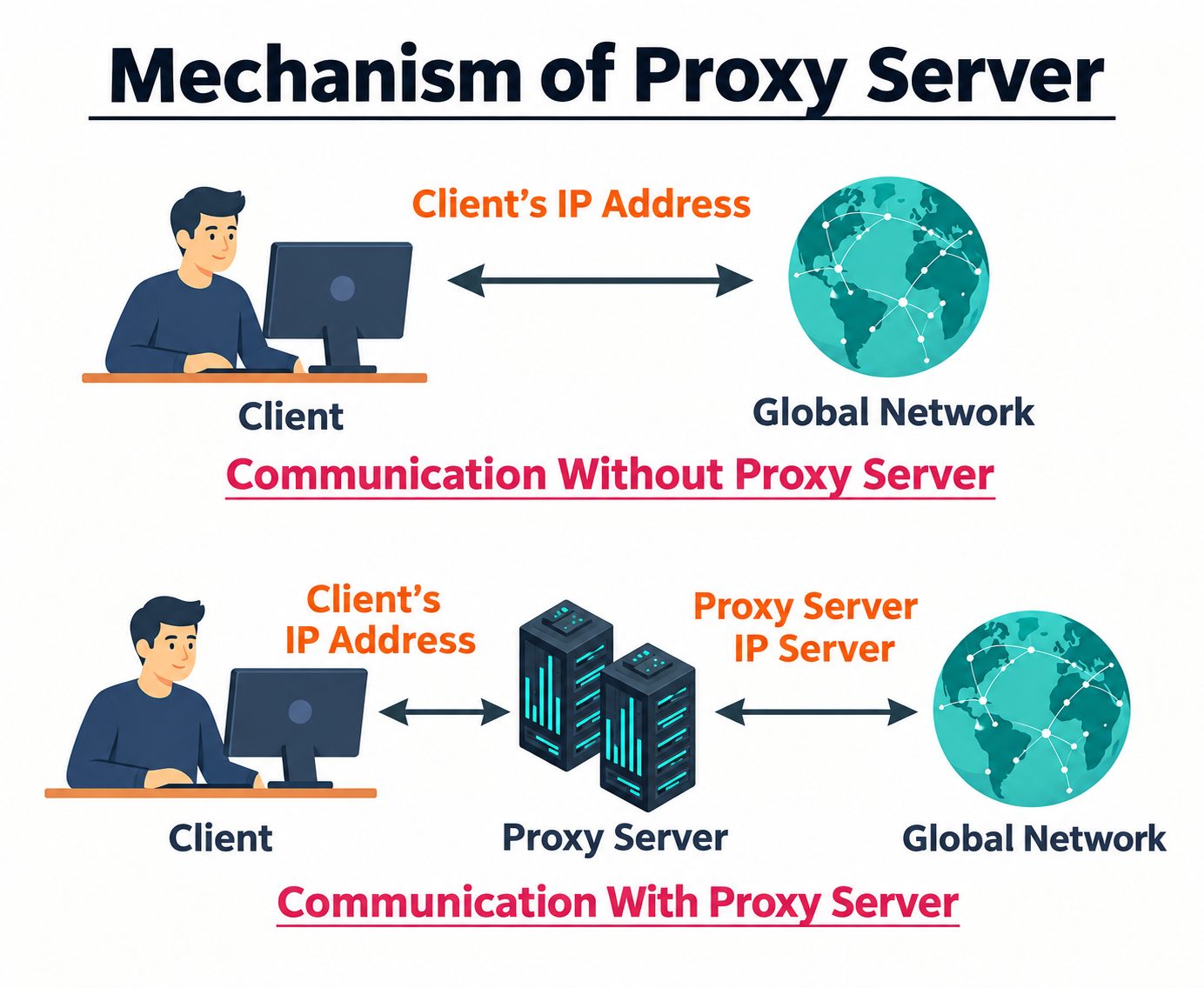
The destination never sees your real address. Your provider still sees that you connected to the proxy itself. Apps outside that browser tab—email clients, games, background updates—continue to use your normal connection.
Want a second pair of eyes on your setup?
Sfeerze is a freelance marketplace where you can book an expert for a live Zoom call and pay for the minutes you use.
Book a short call on SfeerzeHow to Use Proxiyum
Example: a classroom network blocks a news site you need for an assignment, or you want to see the public homepage of a service as it appears from another region.
Step 1: Open the site
Open a normal browser and go to the Proxiyum site. Confirm the address bar shows the domain you expect. Copycat pages are common in this niche.
Step 2: Enter the address
Locate the URL box. Paste the full address (including https://) or type a short keyword if the box supports search.
Step 3: Choose a server
Choose a server location if the page offers a list. Prefer a location marked faster when you only need basic anonymity. Switch to a different country only when the goal is a region check.
Step 4: Load the page
Click Go (or the equivalent submit button). The target page should load inside the proxy frame or rewritten view.
Step 5: Stay inside the session
Navigate using the links that stay inside the session. Opening a new tab and typing the same site directly drops you back to your real IP.
Step 6: Switch servers if needed
If the page fails, is incomplete, or shows a block message, change server location and try once more. Many sites deliberately reject known proxy ranges. A second location sometimes succeeds where the first does not.
Step 7: Close the tab when finished
When you are done, close the tab. The session ends with it. There is no persistent “connected” state on the device.
Optional settings, when present, typically cover encryption level for the proxy hop, DNS preference, and WebRTC behavior. WebRTC can leak a local IP in some browsers even when the page itself is proxied. Disabling or limiting it in the browser (or via the proxy’s option if offered) reduces that specific exposure for the session.
Where Proxiyum Helps
- Simple network filters. School or office filters that block by domain name can often be bypassed by routing the request through another server. It will not defeat a filter that also blocks the proxy domain itself.
- Quick region checks. A marketer can see whether a landing page or set of ads changes by country without installing anything.
- Casual browsing on an untrusted network. Useful when you only need the site to see a different IP and you are not entering passwords.
- Reading public pages. Helpful when you prefer the site not to log your home IP.
It is a poor fit for streaming catalogs that aggressively detect proxies, large downloads, online games, or any login you care about.
Proxiyum-Style Web Proxy vs a VPN
| Question | Browser web proxy (Proxiyum-style) | Typical VPN |
|---|---|---|
| What is hidden? | IP seen by sites loaded through the proxy page | IP for traffic routed through the tunnel |
| What is covered? | That browser session only | Device-wide (or per-app, depending on setup) |
| Encryption | HTTPS to the proxy and onward when the target supports it; not a full device tunnel | Encrypted tunnel for covered traffic |
| Setup | None | App or system profile |
| Cost model | Free, usually ad-supported | Usually paid |
| Best use | One-off unblocking and light anonymity | Consistent privacy across apps and networks |
| Sensitive logins | Avoid | Prefer a reputable provider with a clear no-logs stance |
A web proxy is faster to start and lighter on the device. A VPN is the stronger default when the traffic includes credentials, banking, work accounts, or apps outside the browser.
Proxy or VPN? Ask someone who sets them up.
On Sfeerze, clients can hire for a fixed-price job with wallet escrow, or book minutes when they only need a quick decision.
Find an expert on SfeerzeSafety Limits You Should Know
Free web proxies are convenient precisely because they are simple, and that simplicity creates limits.
- The operator can see the URLs you request through the service and, if a site is not properly protected end-to-end, more of the content. Do not type banking details, email passwords, or government-ID numbers into any page loaded this way.
- Independent checks of free proxy ecosystems have repeatedly found cases of injected ads, altered pages, or weak isolation. Treat the tool as a viewing aid for public content, not a vault.
- Speed varies with how many people share the same servers. Video and heavy pages are the first to suffer.
- HTTPS padlock icons still matter. If the proxy session shows certificate warnings, stop.
- Your own browser remains a source of leaks. Extensions, WebRTC, and a second tab opened outside the proxy all bypass the protection.
- Domain reputation for proxy sites fluctuates. A moderate trust score and occasional security-vendor flags are common. Verify you are on the intended site and keep the use case low-stakes.
Legal and Policy Boundaries
Legal use is generally fine in countries that allow proxy and VPN tools: hiding an IP or reading public pages is not itself a crime. Using any proxy to commit fraud, attack systems, or break a specific local ban on circumvention tools is a separate issue. Workplace and school acceptable-use policies can also prohibit it even when national law does not.
Habits That Make It More Useful
- Use it for the single page you need, then return to a normal connection.
- Prefer servers labeled faster unless location is the point.
- Keep the browser updated and block unnecessary third-party scripts if you can.
- Cross-check important public information by loading the same page directly later. Proxies occasionally serve incomplete or cached views.
- If you need the same protection every day for mail, banking, and apps, move to a VPN or a properly configured system proxy you control. A free web proxy is the wrong long-term layer for that.
Write about privacy or tech? Put the work in front of people.
Sfeerze’s skill feed lets experts share their craft as the storefront, then offer paid calls or jobs from the same profile. Creating a profile is free.
Share your craft on SfeerzeConclusion
Proxiyum is useful when the job is small: mask an IP for a public page, slip past a basic filter, or glance at a site from another region, all without installing software. It works by standing between your browser and the destination for that session only. It does not encrypt your whole device, it should not carry passwords, and its free model means ads and shared capacity. Used with those boundaries in mind, it is a straightforward privacy convenience rather than a complete security product.